Samsung Galaxy Tab S11 Ultra — it’s sleek, it’s fast, and it costs a fortune. But the real question is, does it actually live up to all that hype? After spending real time testing it, the results were surprising — in both good and bad ways.
Galaxy Tab S11 Ultra is Samsung’s latest high-end tablet, aimed at users who want a premium device for work, creativity, and entertainment. It’s built to compete directly with Apple’s iPad Pro — and it’s marketed as a tablet that can actually replace your laptop.
First Impressions & Design
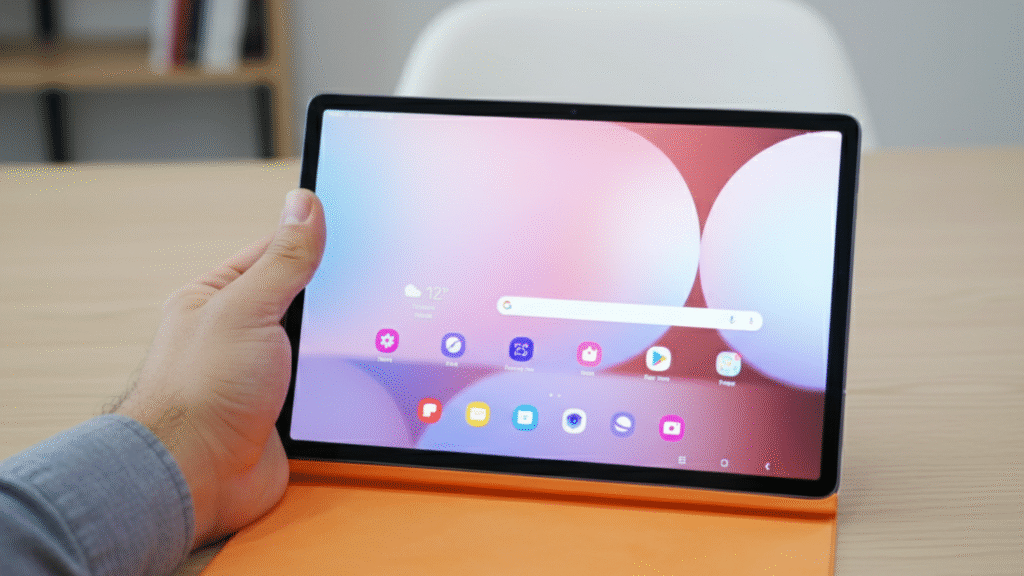
Right out of the box, Tab S11 Ultra looks stunning. The massive 14.6-inch AMOLED display dominates the front, surrounded by razor-thin bezels that make it feel futuristic. The body is made of aluminum, giving it a sturdy, premium feel — though it’s noticeably large and not exactly one-handed friendly.
It’s slim at 5.5mm, lighter than expected for its size, but the sheer footprint makes it less portable than smaller tablets. The matte back finish resists fingerprints well, but the huge camera module at the back still stands out — both visually and physically.
One standout detail is the S Pen magnetically attaching to the back, which feels clean and secure. But carrying it around that way can be risky; it detaches easily if tossed into a bag. Overall, the design screams luxury but leans toward desk use rather than travel convenience.
Setting up Tab S11 Ultra is quick and simple. The initial setup walks through account login, data transfer, and customization with clear prompts. Samsung’s One UI 6.1 is polished and user-friendly, especially with the DeX mode that mimics a desktop interface.
Using it feels smooth — apps open instantly, the interface glides effortlessly, and the 120Hz refresh rate makes every swipe satisfying. For everyday use like streaming, browsing, and note-taking, it’s flawless.
However, its size becomes noticeable during casual use. Holding it for long sessions can be uncomfortable. It works best on a stand or with the optional keyboard cover, which transforms it into a near-laptop setup. Beginners will find it easy to use, but those unfamiliar with Samsung’s software might need a short learning curve.
Performance & Features
This tablet is a powerhouse. It runs on Qualcomm’s Snapdragon 8 Gen 3 chip paired with up to 16GB of RAM. Apps load instantly, multitasking is seamless, and switching between DeX and tablet mode happens without delay.
For creators, the display is where it truly shines. The 120Hz Dynamic AMOLED 2X screen delivers vivid colors, deep blacks, and crisp detail — perfect for drawing, video editing, or Netflix marathons. The S Pen feels natural and precise, with almost zero latency.
Audio quality is impressive too, thanks to the quad-speaker setup tuned by AKG. It’s loud, clear, and immersive. Battery life lands around 12 hours with moderate use, and the 45W fast charging gets it from 0 to 100% in under 90 minutes.
Still, Samsung’s One UI can feel a bit cluttered. There’s a lot of preloaded software, and not every feature feels necessary. For instance, some multitasking gestures require fine-tuning to feel intuitive. Yet, for raw power and versatility, this tablet ranks near the top of the Android world.
Tab S11 Ultra plays best within Samsung’s ecosystem. It syncs effortlessly with Galaxy phones, watches, and laptops — allowing drag-and-drop file transfers and quick note sharing. The “Continue on Other Device” feature is handy for picking up tasks seamlessly.
It works well with most Android apps and accessories, including Bluetooth keyboards, mice, and displays. However, iOS users will face limitations, as the ecosystem integration doesn’t extend beyond Samsung’s and Google’s services.
Tablet also supports external monitors through USB-C, making it more functional for professionals. The DeX mode works surprisingly well for productivity tasks, though it still can’t fully replace a desktop OS. Connectivity is solid, with Wi-Fi 7 support and optional 5G models available.
In real-world testing, Tab S11 Ultra was put through a mix of work and entertainment — editing photos, writing scripts, watching 4K videos, and using DeX mode for productivity.
When connected to the keyboard cover, it handled multitasking with ease — Google Docs, YouTube, and messaging apps all running side by side without stutter. The S Pen was smooth during drawing and note-taking sessions, with the new prediction algorithm cutting down any delay.
However, while streaming or video editing, the size and weight became a drawback. It’s not a casual tablet for the couch; it’s more of a portable workstation. Battery drain was noticeable under heavy loads like 4K editing, dropping about 20% in an hour of intensive use. Still, it charged back fast enough to stay practical for long sessions.
Pros
• Stunning Display: The 14.6-inch AMOLED screen is one of the best on any tablet — vibrant, sharp, and fluid.
• Top-Tier Performance: The Snapdragon 8 Gen 3 ensures smooth performance for gaming, work, and creative apps.
• Excellent Audio: Loud, rich sound from the quad speakers enhances both movies and meetings.
• S Pen Experience: Near-zero lag and improved accuracy make it perfect for artists and note-takers.
• Strong Battery & Fast Charging: Lasts all day with quick top-ups.
• Solid Build Quality: Premium materials and sleek design feel expensive.
• DeX Mode: A real productivity boost for those replacing laptops.
Cons
• Size and Weight: Not ideal for casual handheld use or travel — best used on a table or stand.
• Price: Starts around $1,200 without accessories; adding the keyboard and S Pen raises it further.
• Software Bloat: Pre-installed apps clutter the experience for users who prefer a clean setup.
• Limited App Optimization: Some Android apps still don’t fully take advantage of the large display.
• Magnet Attachment for S Pen: Convenient but not always secure when on the move.
None of these are dealbreakers, but they do remind that this tablet targets power users, not everyone.
Value for Money
At this price point, Galaxy Tab S11 Ultra competes directly with the iPad Pro M4. In many ways, it holds its ground — especially with the superior display and multitasking flexibility. However, once accessories are added, the total cost rivals a full laptop.
For users who rely on Android and Samsung’s ecosystem, the value is clear. It delivers professional-grade performance and excellent hardware. But for casual users who just want a tablet for streaming or browsing, the high price is harder to justify.
The best value comes during promotions or bundle deals that include the keyboard or S Pen.
This tablet is built for power users — content creators, designers, professionals, and students who want laptop-level performance with the flexibility of Android. It’s ideal for digital artists, writers, and multitaskers who appreciate the massive display.
However, it’s not for casual users or those who only need a tablet for light entertainment or reading. The size and cost make it overkill for basic use. Those users would be better off with the smaller Tab S9 or Tab S11 base model.
If portability is key, this isn’t the right choice. But if performance, visuals, and productivity are the top priorities — it’s hard to beat.
Samsung Galaxy Tab S11 Ultra is a statement piece — bold, powerful, and premium. It delivers stunning visuals, blazing-fast performance, and real productivity potential. But it also demands a serious investment of both money and trust in Samsung’s software.
It’s not the perfect tablet for everyone, but it’s the closest Android has come to truly replacing a laptop. For those who can handle its size and price, it’s one of the best tablets money can buy.
In short: a powerhouse for serious users, but a luxury for everyone else.