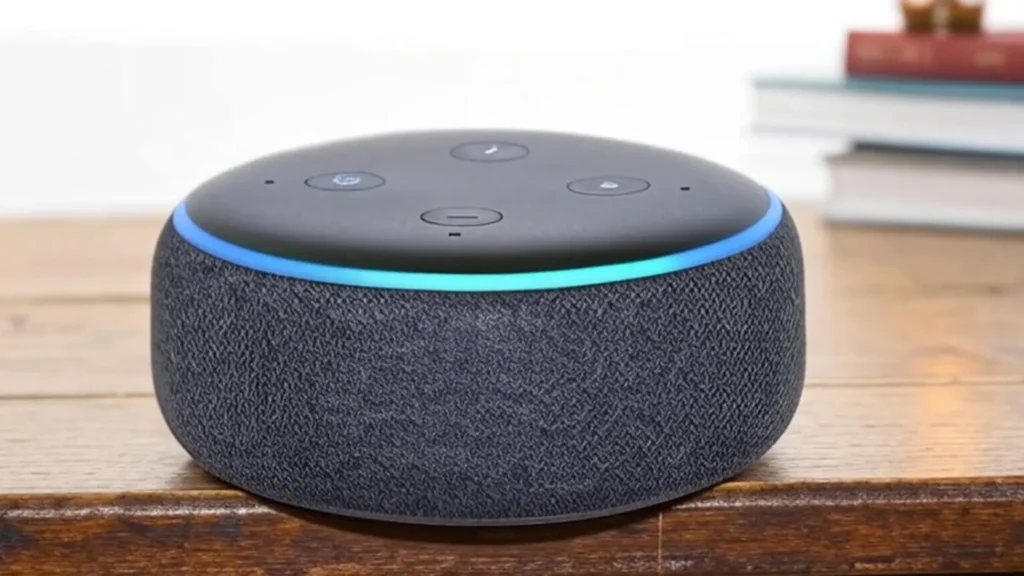
You say a word in your living room, and Alexa lights up. That little ring glows, listens, and sometimes answers before you finish the sentence. But what happens when you’re not speaking to it? What if it’s hearing more than you want it to?
Alexa is in homes, offices, and even cars. It controls lights, locks doors, plays music, and gives you news. But it’s also connected to microphones, apps, and the internet. If it’s always listening, your privacy might not be as private as you think.
This isn’t just about one device. It’s about your life being recorded without permission. If Alexa hears everything, the risks are real—and growing.
How Alexa Listens—Technically
Alexa has a built-in wake word detector. It listens for one thing: “Alexa.” Until it hears that, it’s in standby mode. It doesn’t record or send anything to Amazon.
Once it hears “Alexa,” the microphone turns on. Your voice command is recorded and sent to Amazon’s servers. The servers process your request, then Alexa responds. That recording stays stored—unless you delete it.
Here’s where things get tricky. Alexa is always “listening” in standby mode. That means it’s always scanning for the wake word. That also means its microphone is active 24/7.
Amazon says it’s not recording or storing anything unless it hears “Alexa.” But it must constantly analyze sound to detect the wake word. This means background noise—conversations, TV, laughter—all get scanned.
Sometimes, Alexa gets it wrong. It thinks you said “Alexa” when you didn’t. That leads to unintentional recordings.
In many homes, Alexa activates without anyone calling her. Words that sound close—“Alex,” “election,” “a Lexus”—can trigger it. When this happens, the device starts recording.
You won’t always know it happened. The blue ring lights up for a few seconds. But if you’re in another room or not looking, you’ll miss it.
These false triggers have led to surprising events. Some people found Alexa recorded private conversations without warning. Those recordings were stored in their Amazon account.
You Can Listen to Your Alexa Recordings
There’s a setting in the Alexa app where you can review what it heard. Go to “Alexa Privacy,” then “Voice History.” You’ll find a list of what Alexa has recorded.
Some people report finding audio clips of things they never meant to say to Alexa. These clips can be replayed, saved, or deleted. You have to delete them yourself—they won’t vanish on their own.
This gives you some control—but only after the recording happened. The damage might already be done.
In 2019, a major report broke this story wide open. Amazon workers were listening to Alexa recordings to help improve the service. That’s part of how the speech recognition gets better.
But some of those recordings weren’t commands. They were personal conversations, arguments, or background noise. And they were linked to user IDs, locations, or device serial numbers.
Amazon said the recordings were anonymized. But privacy experts warned that identities could still be figured out. This wasn’t just code being analyzed—it was people, listening to people.
You can press the microphone button on your Alexa device. That turns off the microphone until you turn it back on. When it’s off, the device can’t hear anything—not the wake word, not your voice.
But here’s the pattern break: Most people never use this feature. They want Alexa ready at all times. That means the microphone stays on, listening day and night.
Some devices don’t have physical switches. You need to open the app to mute the mic, and that’s not quick or convenient.
Your Data Stays Longer Than You Think
When Alexa records a command, it doesn’t vanish after the task is done. Amazon keeps the data to improve its services. That includes what you said, when you said it, and how you said it.
Unless you delete those recordings, they stay in your account. You can set Alexa to delete audio after three months or 18 months. But you have to change the setting manually.
Most people don’t. By default, Alexa keeps the recordings forever.
Alexa connects with third-party apps and smart devices. That includes your thermostat, lights, locks, and calendar. When you speak to Alexa, those apps may receive parts of your data.
Each of those services has its own privacy policies. Some share data with partners. Some store voice transcripts. If you use Alexa for smart home tasks, your voice data may go through multiple systems.
You agreed to this when you accepted the terms of service. But most users never read them.
There are no universal rules about voice assistants and privacy. Some countries have strict laws, but others don’t. In the U.S., laws vary by state.
In some states, recording someone without their knowledge is illegal. But Alexa isn’t a person—it’s a device you installed. That makes legal protections murky.
Courts have used Alexa recordings as evidence in cases. In some investigations, police requested user audio from Amazon. This raises questions about who owns your data—and who can use it against you.
Your Voice Is Data
Every time you speak to Alexa, you’re creating data. That includes your tone, pace, and emotional state. Voice data is rich—and valuable.
Companies use it to improve products, train AI, and target ads. Some tech companies build voice profiles to recognize who’s speaking. That profile can include gender, age range, and more.
This isn’t science fiction. It’s real, and it’s happening now.
Google Assistant, Siri, and other voice tools use similar systems. They all have wake word detectors. They all record audio once triggered. They all store those recordings.
If you own any smart speaker, the same risks apply. The problem isn’t just Alexa—it’s the way smart voice tools work.
That’s why understanding how they function matters. Because you might be inviting more ears into your home than you thought.
How to Take Control of Your Alexa Data
Start by checking your Alexa Privacy Settings. Go to your Amazon account. Review your voice history. Delete what you don’t want stored.
Then, change your settings. Set Alexa to auto-delete after 3 or 18 months. Turn off voice recordings for training, so no humans hear your audio.
Next, press the mute button when privacy matters. In bedrooms, meetings, or personal moments, silence the mic. Don’t assume Alexa isn’t listening—make sure.
Look for the blue ring. Whenever Alexa lights up, it’s listening. The ring isn’t just decoration—it’s your signal. If you see it glow and you didn’t speak, review your voice history.
This helps you spot accidental triggers. It also helps you stay aware of what Alexa captures. That awareness is your best defense.
Use a smart plug to power Alexa off when you’re not using it. Set a routine to mute the microphone at night. Add a voice PIN for purchases, so others can’t order things using your Alexa.
Disable voice purchasing if you don’t need it. Turn off unused third-party skills. Keep your Alexa app updated so you get the latest security patches.
You’re not helpless—but you must take action.
Smart assistants bring comfort, speed, and ease. But they also carry cost—your voice, your habits, your data. Each feature comes with a risk.
Alexa isn’t spying. But it is collecting. And what’s collected can be stored, shared, or misused.
That trade-off is the center of the debate. You decide where to draw the line.
Alexa doesn’t record everything. But it does listen always—for the wake word. And when triggered, it can record more than you think.
Some recordings are accidental. Some are stored for years. Some are reviewed by people.
Privacy isn’t just a setting. It’s a habit. If you want to use Alexa safely, learn how to manage what it hears—and what it keeps.